
Restore Multi-Display Order
Never Re-arrange Windows Again
The native macOS multi-display window restorer, Apple Silicon system dossier & developer environment maintenance toolkit built for power users.
xattr -cr /Applications/MacDeck.app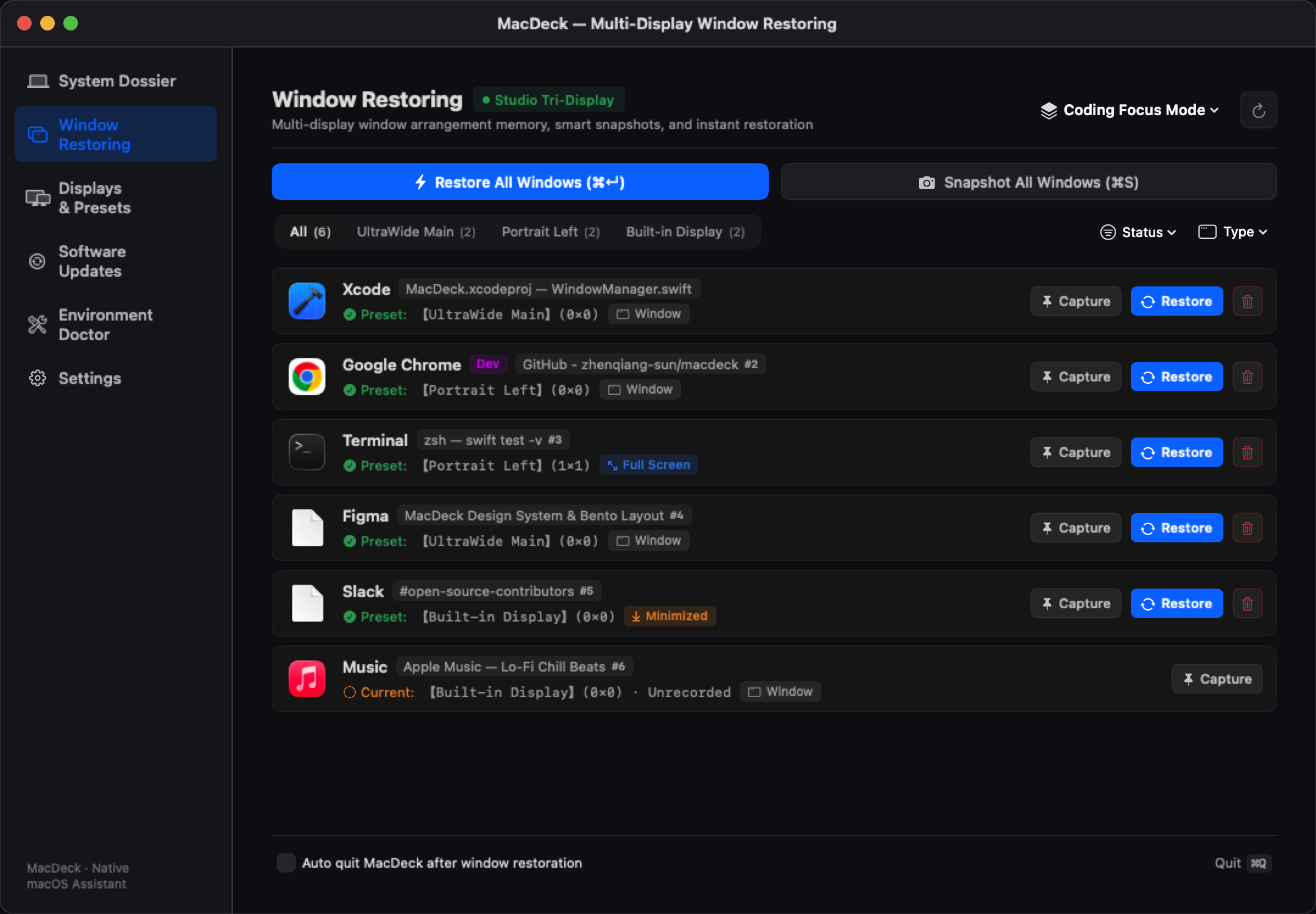
Engineered for macOS Power Users & Developers
Native performance meets deep system control. Take back command over your workspace topologies.
Two-Tier Topology & Window Memory Restoration
Reconnecting monitors or waking from sleep compresses your windows onto the primary display. MacDeck detects display counts and resolutions to restore windows to their designated screens and Spaces.
- Chrome Multi-Profile Isolation: Distinguishes between separate Google Chrome profiles (Personal, Work, Sandbox).
- Fullscreen Space In-Place Retention: Retains fullscreen Spaces via SkyLight private frameworks without animation stutter.
- Hardware-Aware Display Aliasing: Adapts reliably even when monitor hardware UUIDs shift.
- Zero-Background Footprint: Automatically terminates after restoration to free 100% of memory.
Apple Silicon Bento System Dossier
Inspect heterogeneous core layouts (P vs E cores), GPU/Neural Engine capabilities, Unified Memory (UMA) theoretical bandwidth, battery cycle degradation, and real APFS physical storage. Equipped with multi-tier caching for instant launch.
Developer Environment Doctor
One-click health diagnostics for Homebrew (`brew doctor`), Xcode CLT, Docker, Node.js, Rust/Cargo, Pipx, and Volta to diagnose broken symlinks and environment issues.
Safe Cache Reclaim & Multi-Package Hub
Safely reclaim gigabytes of cache and build artifacts with live interactive terminal diagnostic logs. Aggregate and upgrade outdated packages across Homebrew, Cargo, npm, Volta, and Pipx with version pinning and rollback history.
Why Choose Native MacDeck?
Comparison with legacy window managers and commercial cleaners
| Comparison | MacDeck | Commercial Tools (Stay / Moom) | System Cleaners (CleanMyMac) |
|---|---|---|---|
| Architecture | Swift 6 Native (0 Dependencies) | Objective-C / Legacy Frameworks | Bloated Background Daemons |
| RAM Footprint | < 15 MB (Supports Auto-Quit) | 50 MB ~ 120 MB | 300 MB ~ 800 MB (Multiple daemons) |
| Chrome Multi-Profile | ✅ Independent Profile Isolation | ❌ Merged into one Chrome PID | - |
| Fullscreen Spaces | ✅ Native SkyLight Retention | ⚠️ Frequently exits fullscreen / flickers | - |
| Pricing Model | 100% Free & Open Source (GPL v3) | $15 - $40 One-off Purchase | $35+/yr Expensive Yearly Subscriptions |
| Privacy & Telemetry | ✅ Zero Telemetry, 100% Local | ⚠️ Contains analytics SDKs | ❌ Continuous background tracking |
Keyboard-First Precision
Never get lost in nested menus. Essential actions are always one key away.
One-Click Window Restoration
Plug in external screens, press the hotkey, and every window jumps home.
Snapshot Active Layout
Instant snapshot of current window distribution into active preset.
Quit MacDeck
Or enable zero-background mode to quit automatically after restore.
Frequently Asked Questions
Details regarding security, permissions, and architecture
Why does macOS show "Apple cannot check it for malicious software"?
MacDeck is completely free and open-source software, distributed independently without paying Apple's $99/year commercial developer program. This is standard Gatekeeper behavior for independent binaries.
Simply open Terminal and execute this command to clear the quarantine flag:
xattr -cr /Applications/MacDeck.appWhy is Accessibility permission required?
Under macOS sandbox policies, manipulating and repositioning windows of other applications requires the native Accessibility API. MacDeck never records keystrokes or screen captures. Configurations are saved locally as plain JSON in ~/.config/macdeck/.
Does it support Intel-based Macs?
Yes. While the system dossier highlights Apple Silicon architecture, the window restorer, environment doctor, and package hub fully support Intel Macs running macOS 13+.
Does MacDeck drain battery in the background?
Not at all. You can even check 'Auto-quit after restoration'. It launches, completes calculations in milliseconds, and exits cleanly.
Elevate Your macOS Multi-Display Experience
Download MacDeck today and eliminate repetitive window repositioning forever.